CAD that speaks your language.

Describe a part. Get printable CAD.

STEP · STL · 3MF · DXF

Demos

From a sentence to a finished part.

Every part here was described in plain language. Turn the model, measure it and cut a section through it.

Machined

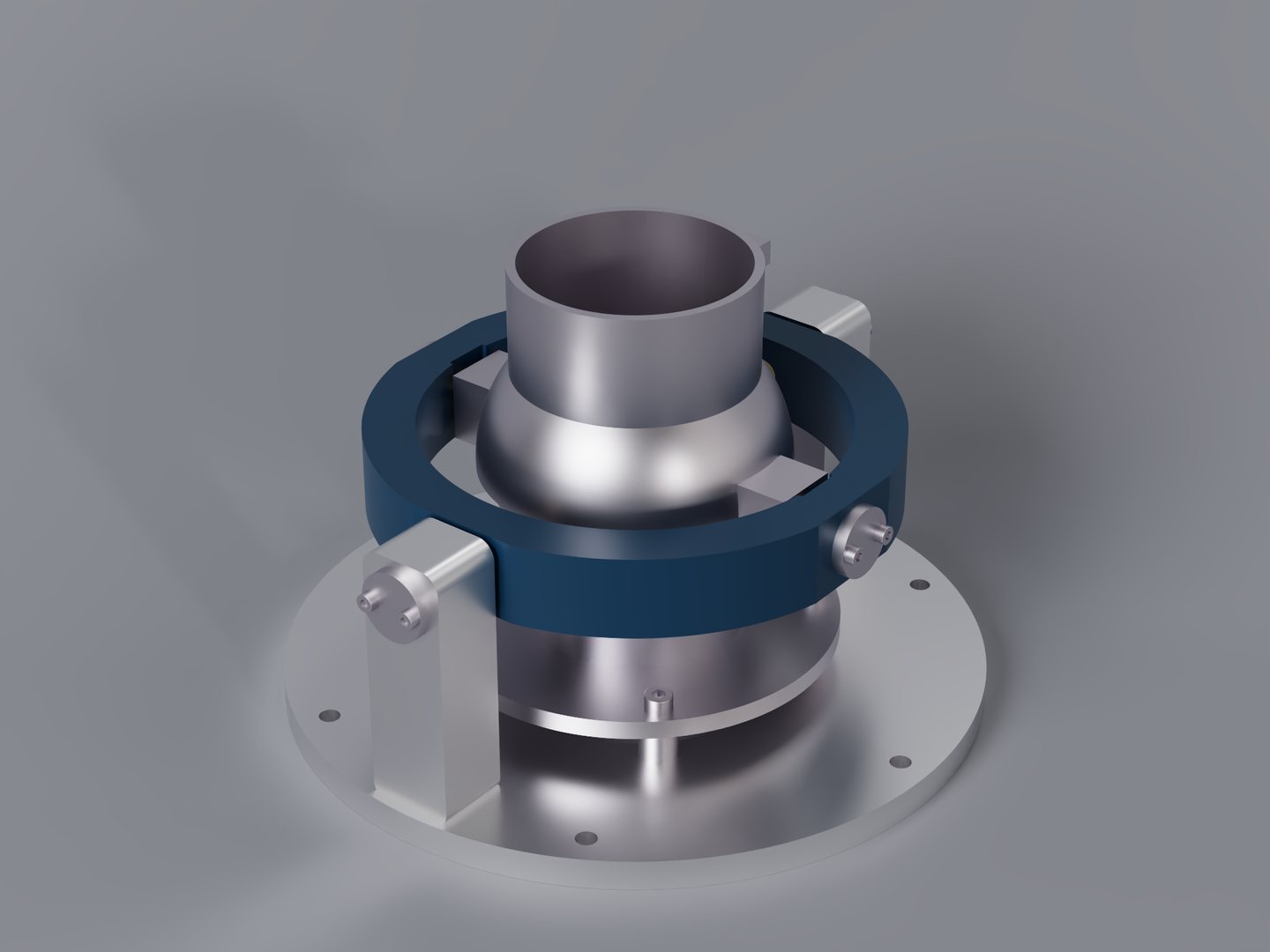
Thrust-vectoring nozzle

Prompt

“Create a gimbaled thrust vectoring nozzle for a JetCat p100 engine. It should have 360 degrees of freedom. Create a basic rendering of it. It will be machined.”

What the agent asked

1 / 3

By 360° freedom, do you mean the nozzle can tilt toward any direction around the exhaust axis? A two-axis gimbal provides that within a limited cone.

  • Any direction, up to 15° tilt from centre
  • Any direction, up to 20° tilt from centre
  • Continuous 360° rotation as well as tilting

Other: type your own answer
How it works

Describe it. The agent does the engineering.

An agent that asks what it needs, builds the model, and refines until the geometry holds up.

  1. 01

    Describe it

    Plain language, the way you'd brief a human designer. Give it dimensions, fits and standards, or just the idea.

  2. 02

    The agent works

    It asks what it needs to know, builds the model, and checks its own work, measuring the result against your spec until it's right.

  3. 03

    Outputs ready-to-make files

    Download editable CAD (STEP) and print-ready meshes (3MF and STL).

Manufacturability, built in

LexiCAD thinks about how the part gets made.

You describe the part, nothing about printing. The agent works out load paths, wall thickness, the weak link and the right orientation. It builds intelligently and explains its decisions in plain terms.

Strength and printability

Quick load-path analysis, quantized walls and support-free orientation, plus warnings when your instructions lead to a fragile part.

Laser-cut, done right

Anisotropic-stress and grain-direction labels, pieces sized to your stock, and clean per-panel files ready to cut.

Features

What LexiCAD can do, including what you might not think to ask for.

What the agent can design

  • Parts to 3D printBrackets, enclosures, holders, replacement parts.
  • Assemblies that moveGears, hinges, cranks, slides, snap fits.
  • Threads and knurlsThreads that fit real bolts, and knurled grips.
  • Standard partsPlaced as references to check the fit, such as bearings.
  • From what you haveA sketch, photo, drawing or model.
  • Text on a partEngraved or raised, in a font you pick.
  • Laser cuttingFinger-jointed and slot-together boxes and furniture, sheets laid out.
  • Technical drawingsDimensioned, ready to print.

What the app can do

  • Parametric editsChange a value and the model rebuilds, no AI.
  • Look inside the modelMeasure, section, explode, check walls and overhangs.
  • Every version keptGo back to any version, or branch from one.
  • Export3MF, STL, STEP, DXF, SVG, PDF.
  • Share by linkView only; downloads and chat if you allow.
  • Draw what you meanA sketchpad beside the message box.
  • Choose how much to spendPick the model tier and a budget cap.
  • An email when it's readySent when a build finishes.

Renders and animations

  • Photorealistic rendersAny view, size and quality.
    A photorealistic render of the thrust-vectoring nozzle
    A thrust-vectoring nozzle, rendered as it was asked for.
  • AnimationsTurntables and mechanisms in motion.
    A tracked rover driving forward, played in your browser. Switch between Shaded with edges and Edges only.

FAQ

What is it good at, and what isn't it for?
  • Mechanical parts: brackets, enclosures, fixtures
  • Whole assemblies: gearboxes and mechanisms
  • Robots, with motors, bearings and screws placed to check the fit
  • Threads, gears and algorithmic geometry
  • Laser-cut objects laid out on your sheets
  • Designs from your sketches, photos and existing files
  • Technical drawings, photorealistic renders and animations
  • Characters and figurines
How accurate is it?

It builds to the exact dimensions you specify: real units, flat faces, not an approximation. Say 45 mm and the part comes out 45 mm.

Can I edit the result, or am I locked into the AI's output?

You get real, editable CAD: a STEP file you can open and modify in your own tools, not a frozen mesh. You can also change a design's parameters directly in LexiCAD, and it rebuilds.

How is this different from asking ChatGPT?

General assistants like ChatGPT and Claude are capable: they can write CAD code and even run it. What they don't do is give you a manufacturable part reliably. They sometimes check their work and sometimes don't; when I asked ChatGPT for a bench vise, the handle passed through other parts and the jaw floated in mid-air, and nothing flagged it. LexiCAD is built for this one job. It carries the know-how of designing parts that get made: walls thick enough to print, overhangs that don't sag, threads shaped to print cleanly, assemblies that can actually be put together, laser-cut parts laid out on the sheets you have. And the checking isn't optional: every design is built, inspected and measured against what you asked for, and reworked until it holds up, every time. Around that you get the tools a chat window doesn't have: a 3D viewer where you can measure the part and cut a section through it, a version history you can rewind, and real STEP, STL and DXF files at the end.